Container loading calculator
3D load plan for boxes and crates
Enter the container and your boxes. The calculator makes a 3D load plan with mixed box sizes, shows how many boxes fit, and lists the loading steps.
Container sizes checked on the Hapag-Lloyd website: 4 November 2026
Door opening: 92.1 in wide, 102.2 in high. Sizes are nominal Hapag-Lloyd values. Check the plate on your container.
| Name | Length (in) | Width (in) | Height (in) | Quantity | Weight each (lb) | Rules | Remove |
|---|
Use the outside size of each box. Leave the quantity empty to fill the space with that item. Up = this side up: the height stays vertical. No stack = put nothing on top of this item.
The 3D view loads here.
Drag to turn the view. Pinch, or hold Ctrl and scroll, to zoom.
Enter the space and the items, then select Plan the load.
Loading steps
Example: a mixed load in a 40 ft high cube
The calculator opens with this load: 300 cartons of 24 × 16 × 16 in, 500 cartons of 18 × 12 × 12 in and 6 crates of 48 × 40 × 40 in. The crates carry nothing on top.
All 806 items fit in 7 loading steps. They fill 77.3% of the space and weigh 18,900 lb. The crates go in last, near the door.
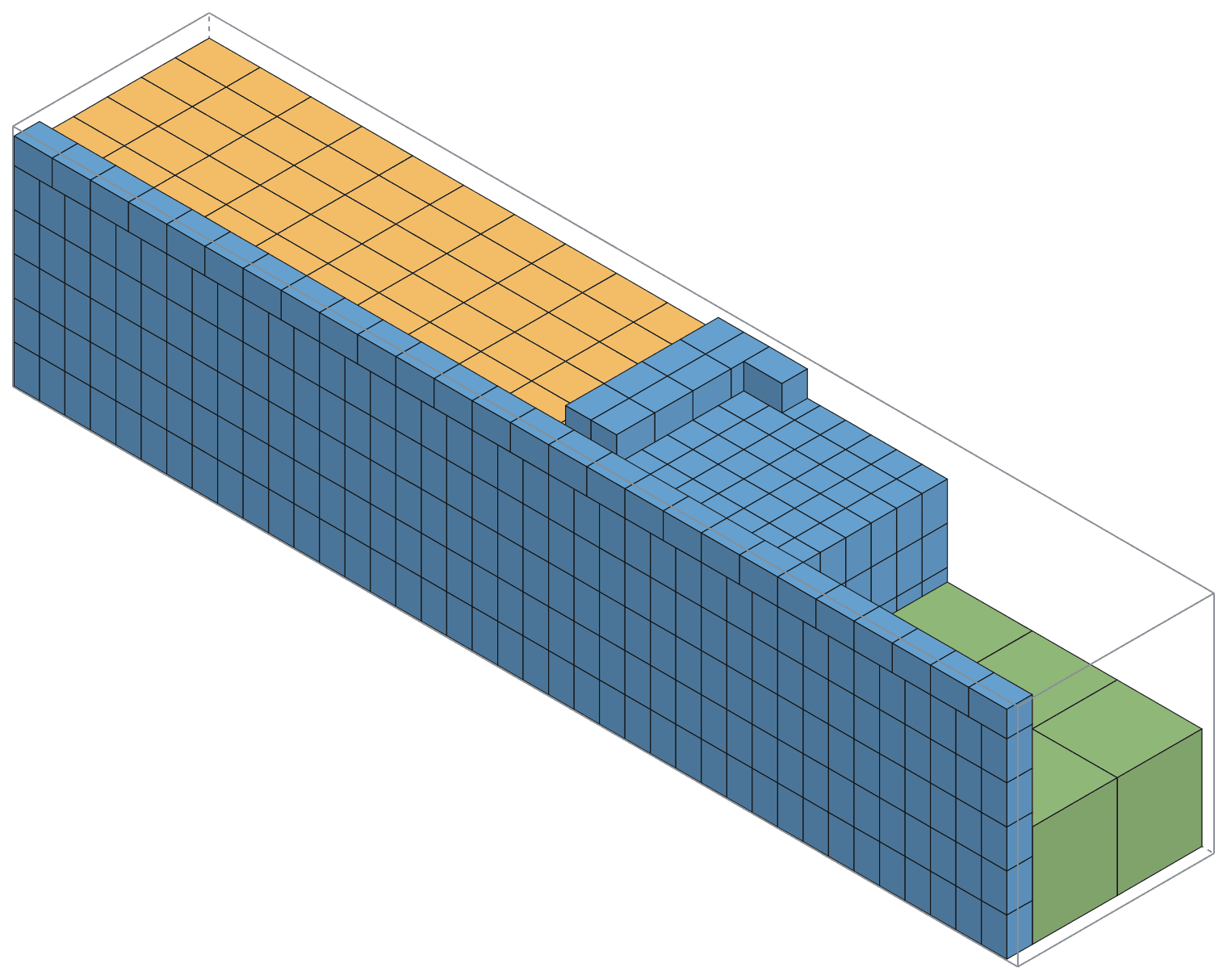
NOTE: A container is never 100% full. The space between the top of the stack and the roof, and the gaps at the sides, stay empty. A fill of 75% to 90% is normal for cartons.
How many cartons fit in a container
Table 1 gives the number of cartons of one size that the calculator loads in each container. A simple grid points all cartons the same way. The calculator also turns some cartons to use the space at the walls and the roof. For these sizes, this loads up to 22% more cartons.
| Carton (outside) | 20 ft | 40 ft | 40 ft high cube |
|---|---|---|---|
| 12 × 12 × 12 in | 931 | 1,911 | 2,184 |
| 16 × 12 × 12 in | 788 (grid 686) | 1,618 (grid 1,421) | 1,804 (grid 1,638) |
| 18 × 12 × 12 in | 703 (grid 665) | 1,443 (grid 1,365) | 1,638 (grid 1,560) |
| 18 × 18 × 16 in | 350 | 725 | 855 (grid 780) |
| 20 × 20 × 20 in | 176 | 368 | 460 |
| 24 × 16 × 16 in | 275 (grid 225) | 570 (grid 475) | 646 (grid 580) |
| 24 × 18 × 18 in | 237 (grid 225) | 487 (grid 475) | 520 |
| 24 × 20 × 20 in | 174 (grid 144) | 364 (grid 304) | 443 (grid 380) |
No pallets. The number in brackets is the best simple grid when it is lower. Inside sizes from Hapag-Lloyd: 20 ft 5,900 × 2,352 × 2,393 mm, 40 ft 12,032 × 2,352 × 2,395 mm, 40 ft high cube 12,032 × 2,350 × 2,700 mm.
NOTE: Weight can stop a load before space does. A 20 ft container takes about 28,000 kg of cargo. Enter the weight of each item to check.
Mixed patterns on a pallet
On a 48 × 40 in pallet, a simple grid puts 9 cartons of 16 × 12 in on each layer. The calculator puts 10 on each layer: six cartons one way and four turned. With 5 layers of 12 in, that is 50 cartons, not 45.
For 18 × 14 × 10 in cartons, the calculator loads 40 cartons, and a grid loads 36. To plan one carton size on a pallet with layer patterns and overhang, use the boxes per pallet calculator.
How the calculator plans the load
The calculator loads from the back wall to the door. At each step, it finds the first free corner: nearest the back, then nearest the floor, then nearest the left wall. It tries each item in each allowed direction and makes a block of the same boxes: across, up, then deep.
For the first steps, it also tries smaller blocks. It finishes the plan from each block and keeps the block that gives the largest load. It does this for several item orders and shows the best plan.
Rules that the plan obeys
- Boxes do not overlap and stay inside the space.
- A box above the floor has at least 75% of its base on the boxes below.
- An item marked Up keeps its height vertical. It can turn on the floor.
- No box goes on top of an item marked No stack.
- The total weight stays below the maximum weight.
- Each step comes after the steps that carry it, so you can load in the order of the list.
CAUTION: The calculator does not know how much weight a box can carry, and it does not check the axle loads of a truck. Put heavy boxes at the bottom, and keep the center of gravity near the middle of the space.
NOTE: The plan is a good plan, not always the best possible plan. For one carton size, it is never worse than the best simple grid. Real loads need space for your hands and for straps, so plan for a few less boxes.
How to plan a container load
- Measure the outside of each box: length, width and height.
- Weigh one box of each item.
- Select the container, or enter the inside size of the truck or pallet load.
- Enter each item and the quantity. Mark items that must stay upright or that cannot carry weight.
- Select Plan the load.
- If items do not fit, use a larger container or move some items to a second load.
- Use Play to see the loading order. Copy the link and send it to the people who load.
Related tools: how many boxes of one size fit in a container · CBM calculator · cargo van fit · boxes per pallet.
Container sizes
| Container | Inside size | In inches | Volume | Max payload | Door (W × H) |
|---|---|---|---|---|---|
| 20 ft container | 5,900 × 2,352 × 2,393 mm | 232.3 × 92.6 × 94.2 in | 33.2 m³ | 28,130 kg | — |
| 40 ft container | 12,032 × 2,352 × 2,395 mm | 473.7 × 92.6 × 94.3 in | 67.8 m³ | 28,750 kg | 2,340 × 2,292 |
| 40 ft high cube | 12,032 × 2,350 × 2,700 mm | 473.7 × 92.5 × 106.3 in | 76.3 m³ | 28,600 kg | 2,340 × 2,597 |
The 20 ft page gives no door size, so the calculator does not check the door for a 20 ft container.
We copied these sizes from the Hapag-Lloyd container pages on 4 November 2026. Hapag-Lloyd says that the sizes are examples and change with the maker. Check the plate on the door of your container.
- Hapag-Lloyd: 20′ standard container
- Hapag-Lloyd: 40′ standard container
- Hapag-Lloyd: 40′ standard high cube container
The 3D view uses three.js (MIT licence), loaded from cdnjs.